Server Implementation When Implementing Several Companion Products
Read this guide in conjunction with Installation Readiness Assessment Guide for each CSC Companion product you are installing.
The CSC Companion products are not Web security applications; they are financial applications that rely on an existing Web security infrastructure. By itself, the Companion products authorize only the users of the application and restricts their use based on profiles defined by the system administrator.
Any financial institution that establishes an Internet presence through a Companion product site (one that uses Advanced Claims, Agency Link, Business Intelligence, Information Ordering, and/or Underwriting) must take steps to ensure the systems they use or own contain adequate security measures. These measures help limit the possibility of unintended distribution of confidential information and the potential for fraud-related losses.
The Internet is designed as an open system, based on the premise of free access and communication between participating computer systems. While there is no guarantee of complete safety and invulnerability, every effort must be made to provide a safe, secure, and protected platform for financial activity.
The details of placing Companion product servers in relation to your firewalls and associating the servers to specific domain(s) depend upon your specific security requirements. Based on the development of the Companion products and the protocols used between the servers, the following pages outline two of many implementation models. Following the implementation models are brief instructions for hardening, as well as references to useful articles and links about security.
In distributed applications such as the Companion products, other resources require protection in addition to the Web and Application servers. A recommended practice is to put another firewall between the Web/Application servers and the database servers, creating a “demilitarized zone” or DMZ in the event your perimeter defenses are compromised and an intruder gains access to the Web or Application severs. Communication protocols between the some of the Companion product servers require opening selected ports through firewalls from the DMZ to the internal network. This is applicable to all implementation models.
Several of the Companion products (Agency Link, Information Ordering, and Underwriting) use a component called Communications Framework (CFW) that resides on the CFW server. The CFW server is for message communications to and from enterprise-specific services. Communication includes transformation and transportation of the messages. Not all of the functions of these three Companion products require this server. Please contact your CSC services representative to identify the functions that require CFW.
The Communications Framework server can reside within your DMZ or behind your corporate firewall – firewall 2.
The following table lists security ports you may need to open for customizing your implementation. Y = Needed. Blank = Not needed.
|
Ref #
|
Connection Type
|
Default Port Number(s)
|
||||||||||
|
Client -> Web
|
HTTP/ HTTPS
|
|||||||||||
|
4758 (configurable)
|
||||||||||||
|
Configurable (any unused port)
|
||||||||||||
|
HTTP/ SOAP
|
80 (see footnote “A”)
|
|||||||||||
|
App -> System i
|
Mapped drives 135, 139, 445
|
|||||||||||
|
App -> System i
|
Mapped drives 135, 139, 445
|
|||||||||||
|
POINT -> App
|
||||||||||||
|
Database access
|
DB -> System i
|
449, 8470, 8471, 8472, 8475, 8476
|
||||||||||
|
Database access
|
Web/App -> System i
|
449, 8470, 8471, 8472, 8475, 8476
|
||||||||||
|
Download from System i
|
||||||||||||
|
DB -> Web/App
|
||||||||||||
|
POINT host communication
|
CFW -> POINT
|
23, 449, 8470, 8471, 8475, 8476
|
||||||||||
|
Series II host communication
|
||||||||||||
|
Series II host communication
|
||||||||||||
|
HTTP/ SOAP
|
||||||||||||
|
Single Sign-On (SSO)
|
||||||||||||
|
SSL 636, UDP 88 or 389, UDP 88
|
||||||||||||
|
Single Sign-On (SSO)
|
SSO -> Browser
|
|||||||||||
|
SSO System i Authentication
|
SSO -> System i
|
23, 449, 8470, 8471, 8475, 8476
|
||||||||||
|
POINT host communication
|
||||||||||||
|
IO Scheduler Listener
|
||||||||||||
|
POINT host communication
|
POINT -> CFW
|
|||||||||||
|
Jacada Web Access
|
If you have any of the following functions enabled or products installed, you must open port 80 between CFW and the Web server.
For issue 86936, the settings were moved into the web.config file. The new item is the ‘webcallbackport’, which specifies the port on the Web server used for remoting. By contrast, the ‘serverport’ item is the Application server port used for remoting.
<!-- This is the remoting callback port for the web server. If you have remoting enabled but are only using one machine, the <webcallbackport> should be set to a different port than the <serverport>. If 2 machines are used, they can be set to the same port. -->
To configure remoting for Document Print, locate web.config in the <drive>:\<target>\DocPrintService\WebServer\WebService folder.
Specify an available port for “Port” and set “remotingenable” to “true.” If remoting is enabled for a single server configuration, the “callbackport” should be set to a different port than the port specified in “Port.” For a two-server configuration, the same port value can be used.
In the Application server MediaMgtApp.xml file in the “Remoting” section, specify the following:
|
•
|
Port – Application server remoting port
|
|
•
|
EnsureSecurity – Channel security setting (either Y or N)
|
In the Web server MediaMgtWeb.xml file in the “Remoting” section, specify the following:
|
•
|
Enabled – Flag to enable remoting (either Y or N).
|
|
•
|
Server – Application server name or IP address.
|
|
•
|
Port – Application server remoting port. This must equal the Application server value.
|
|
•
|
CallbackPort – Web server remoting port for callback to the Web pages. This value should be different from the Port and WSCallbackPort values.
|
|
•
|
WSCallbackPort – Web server remoting port for callback to the Web service. This value should be different from the Port and CallbackPort values.
|
|
•
|
EnsureSecurity – Channel security setting (either Y or N). This must equal the Application server value.
|
|
•
|
SingleServer – Set to Y for a single-server installation. Set to N for a two-server installation.
|
C. CAUTION for Agency Link and Information Ordering when interfacing with ChoicePoint
ChoicePoint does not offer an encrypted protocol for communication. Clients should take measures to ensure data is protected by using a dedicated communication line or Virtual Private Network to ChoicePoint.
When you have a Web site, your users can encounter errors such as "Page not found" or "Page 404 Error." You can customize the text of these error messages to make them more user-friendly and to prevent a technical error from revealing more about your web-site than you might want. Messages can be modified through Windows IIS. Two related articles can be found at the following URLs.
Implementation Model: All Companion Products
The following diagram illustrates the configuration recommended for both performance and space considerations when implementing multiple Companion products. The advantages to separate servers are that performance is optimized and risks are minimized. For example, if one application has a problem, then other applications are not directly affected.
If you need to consolidate for cost considerations, other configurations are possible. For instance, the Media Management Web piece can be housed on your Agency Link Web server.
In any case, make sure you have a database maintenance plan in place. Back up servers on a regular schedule. On database servers, run maintenance plans to back up the databases.
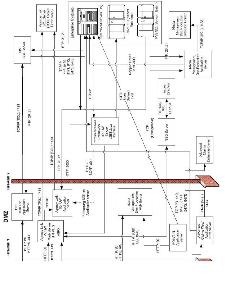
There are two implementation configurations that may be used with the Companion products. Model one has individual Web and Application servers in the DMZ. Model two has the Web and Application servers on one machine in the DMZ.
Some of the Companion products can be implemented with either model one or two. However, some of the products can only be implemented one way. For details and diagrams, see—
